
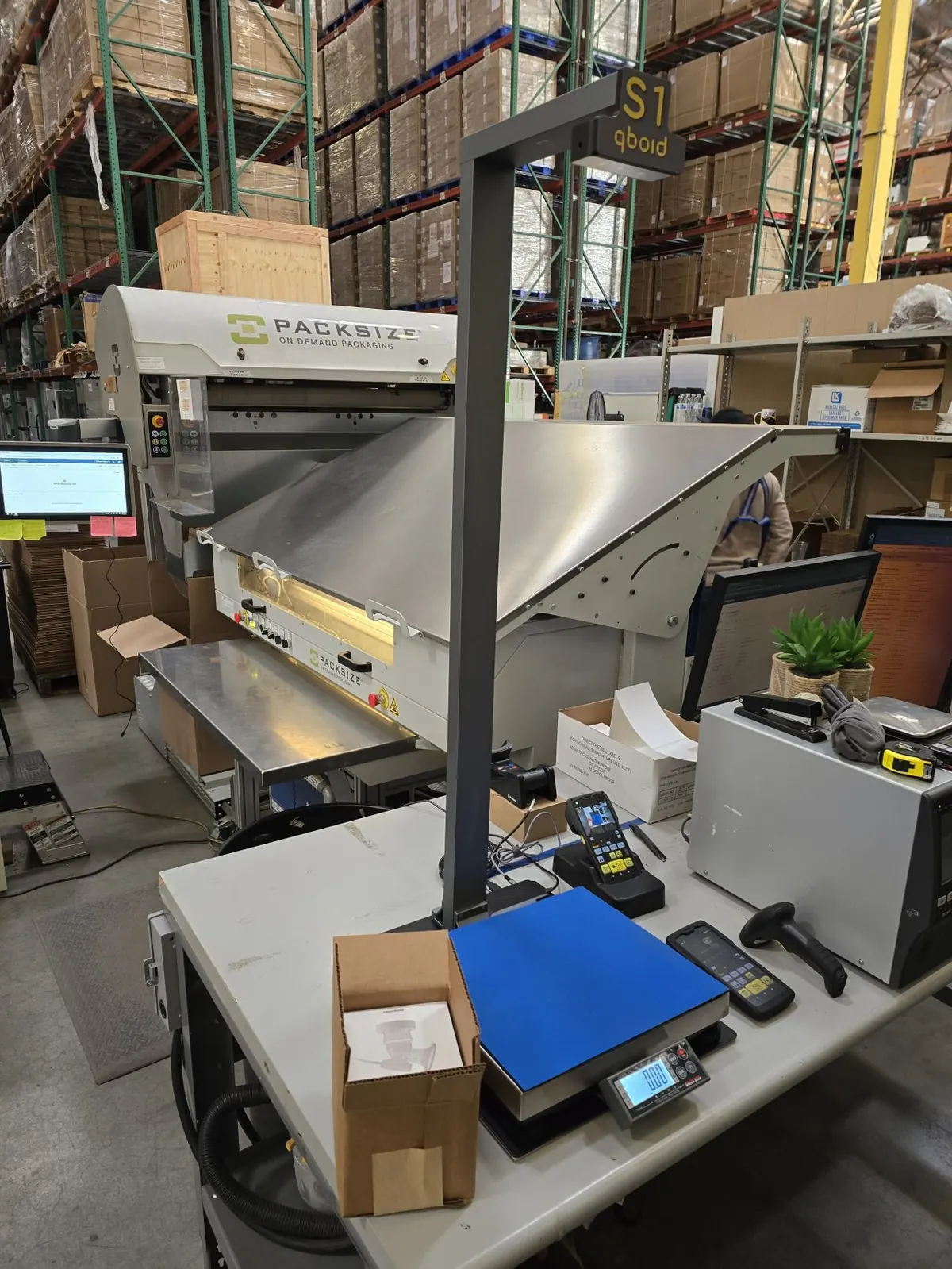
Solution · Warehouse operations
Receiving & item master data
Capture dimensions, weight, barcode and photo as goods arrive.
Measure every new item once, at the receiving bench or on the dock, with the M2 handheld or the S1 benchtop station, and write the record to your WMS or ERP. Supplier data gets checked before it spreads downstream.
- Captured per item
- Dims + weightwith barcode, three photos and your own fields
- Accuracy
- ±0.25 inboxes; ±0.5 in on irregular items
- Where it goes
- WMS · ERPover HTTPS, or through QBOID Cloud
- Mann Lake
- 10,000+ productsin under two weeks Pending approval
The problem
Bad data in, bad data out.
Item dimensions usually arrive from suppliers, or not at all. Every process after receiving inherits what goes into the item master.
Supplier data is often wrong
Dimensions and weights from upstream suppliers can be missing, out of date or for a different pack size. Every later step inherits the error.
Measuring by hand doesn't scale
Tape measures are slow and every figure is typed. Catalogs of thousands of SKUs never get done, and new items arrive every week.
The cost shows up later
Wrong putaway locations, the wrong carton at packing, shipping quotes that are too high or too low, and carrier adjustments. Fixing records later means finding the item again.
Current approaches
Four ways to measure at receipt.
Each has a place. Here's how they compare for item master data.
| Compared on | Tape measure | Fixed dimensioning station | Phone measuring app | QBOID M2 + S1 |
|---|---|---|---|---|
| Speed | Slow; every figure typed | Fast, once the item is at the station | Medium | Fast; on the S1 a barcode scan starts the capture |
| Where it works | Anywhere | One spot; items are carried to it | Anywhere | At the receiving bench, or undocked at the pallet or shelf |
| Irregular items | Hard to do consistently | Depends on the system | Often limited | Bounding box, tagged irregular |
| Data captured | Dimensions, typed by hand; no photo | Dimensions, often weight | Dimensions; weight and barcode are separate steps | Dimensions, weight, barcode, shape and three photos in one record |
| Into the WMS or ERP | Typed in | Integration project | Varies | HTTPS push, QBOID Cloud or WorkFlows |
| Pallets and oversized | Yes, slowly | Separate equipment | Rarely | Pallets app on the same handheld |
| Trade-off | Errors, especially on irregular items | Floor space, installation, capital expense | Results depend on the phone and the operator | Not for transparent or shiny items, or direct sunlight |
The QBOID way
Measure once, at the door.
Accurate data from the start of the item's life in your warehouse: the S1 for volume at the bench, the M2 for anything on a pallet, on a shelf or too big to lift.
- 01
Scan the barcode
Of the item or the receiving document. On the S1, the scan starts the capture: no screen taps.
- 02
Measure
Point the M2 and press one key, or place the item under the S1. Weight comes from the paired or built-in scale.
- 03
Check
Compare with the supplier's figures. A WorkFlows app can flag differences for review.
- 04
Write back
The record and its photos go to the item master in your WMS or ERP, or to QBOID Cloud to review and export.
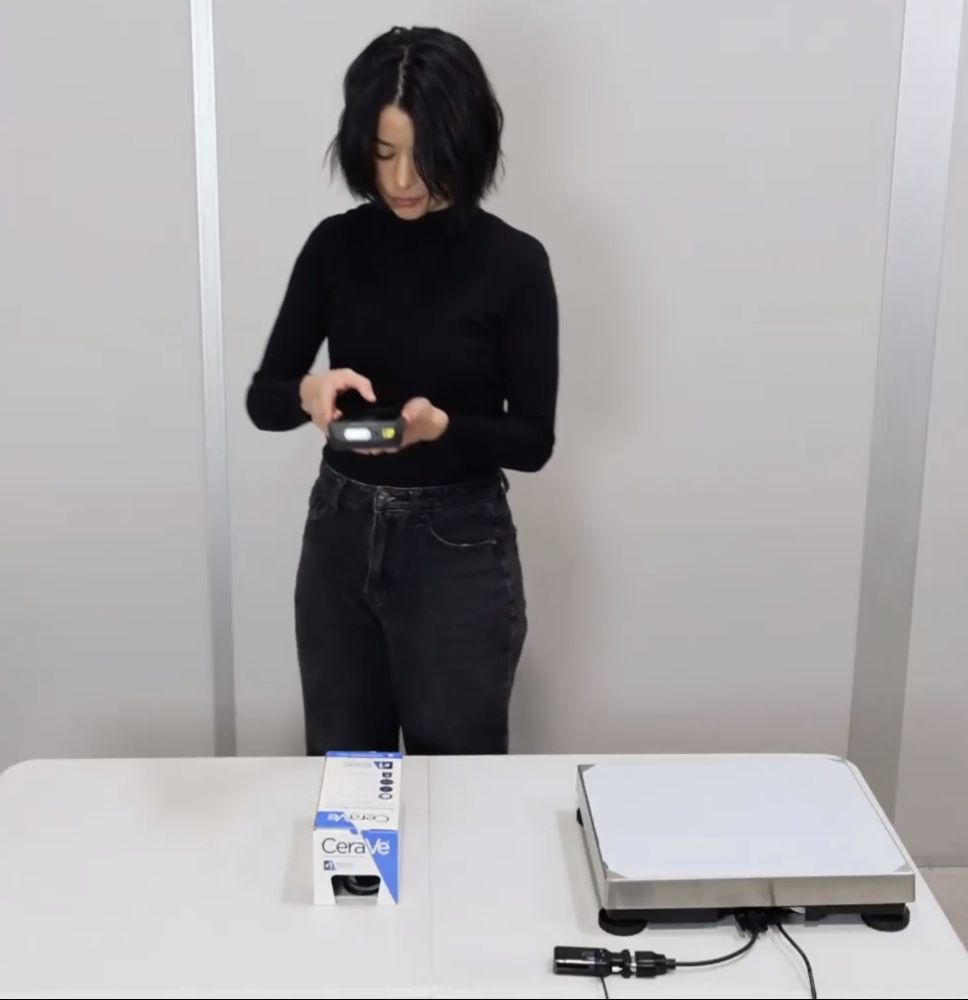
Check supplier data before it spreads.
You don't have to replace supplier dimensions to fix them. Scan the barcode, measure, and compare the result with the supplier's figures in your WMS or ERP. Or build the comparison into a WorkFlows app that flags items outside your tolerance for review.
- Keep supplier values that match; correct the ones that don't
- Catch wrong pack sizes and missing weights at the door
- A photo of every item as evidence for supplier conversations
What it changes
Right from the first record.
Dimensions and weight captured at receiving feed every later step, from putaway to the carrier invoice.
Less rework
Less labor spent measuring and re-checking supplier data, and no re-measuring at packing or when a carrier adjusts a charge.
Space that fits
Putaway and slotting put items in locations that fit, which also speeds up picking downstream.
Right rates, right carton
Accurate shipping quotes from real dimensions, and the right carton chosen at packing.
A photo of every item
For picking, quality checks and questions from suppliers or customers.
Ready for automation
AS/RS, cartonization and robotic picking need item dimensions before they can start.
A catalog that stays current
New products are measured as they arrive, so the item master doesn't drift again.
Devices for the job
Handheld, benchtop, or both.
The M2 docks into the S1, so one device covers the bench and the floor.
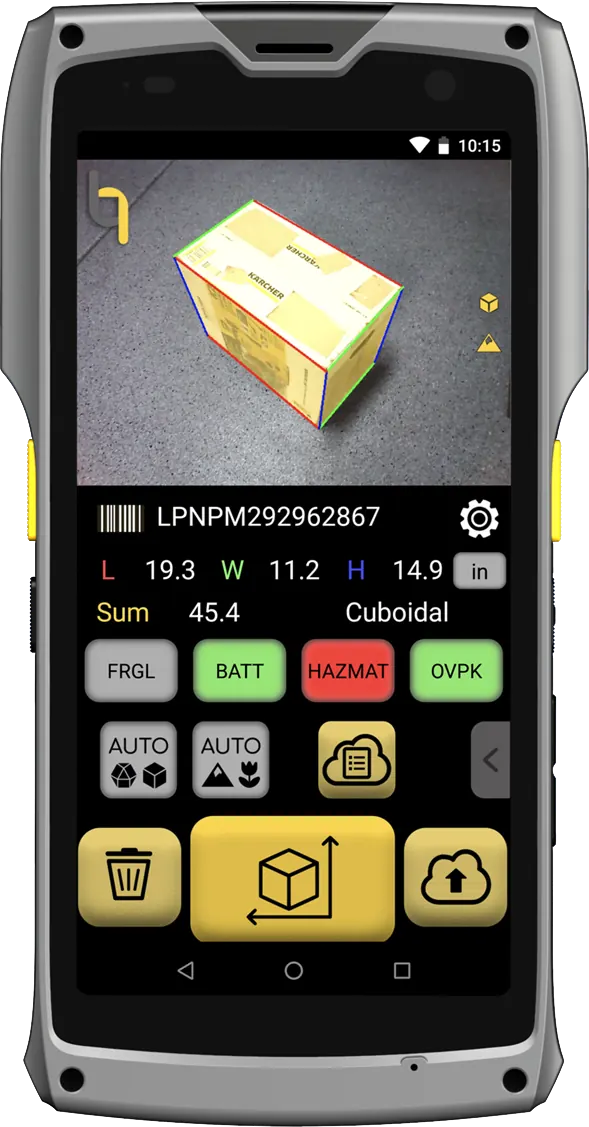
Device · handheld
M2 Mobile Dimensioner
For items on pallets and shelves, or too big or heavy to lift. Measure where the item is, then move on.
- ±0.25 in on boxes, ±0.5 in on irregular items
- Pallets from about 3 ft up to 7 ft with the Pallets app
- Works offline; records sync over Wi-Fi
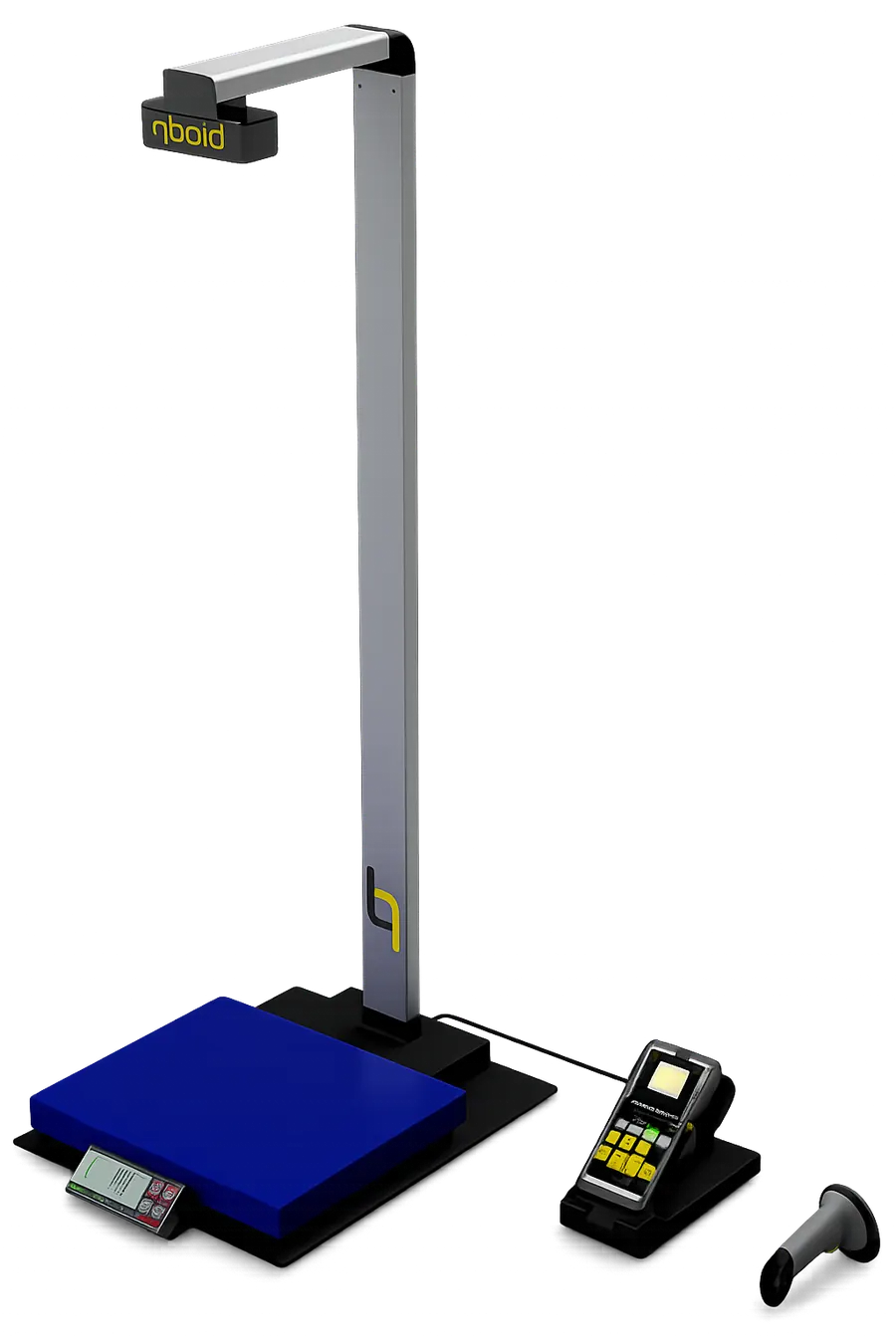
Accessory · benchtop station
S1 Accessory
For items that come to a bench at volume: a barcode scan captures dimensions, weight from the built-in scale and photos, hands-free.
- Wireless barcode scanner starts each capture
- Handles deformable and irregular parts
- S1 mode is included in the Item & Parcel app licence
Time per item on the S1: tested figure to be published. Accuracy conditions and size limits are in the M2 spec table.
Data captured
What lands in your item master.
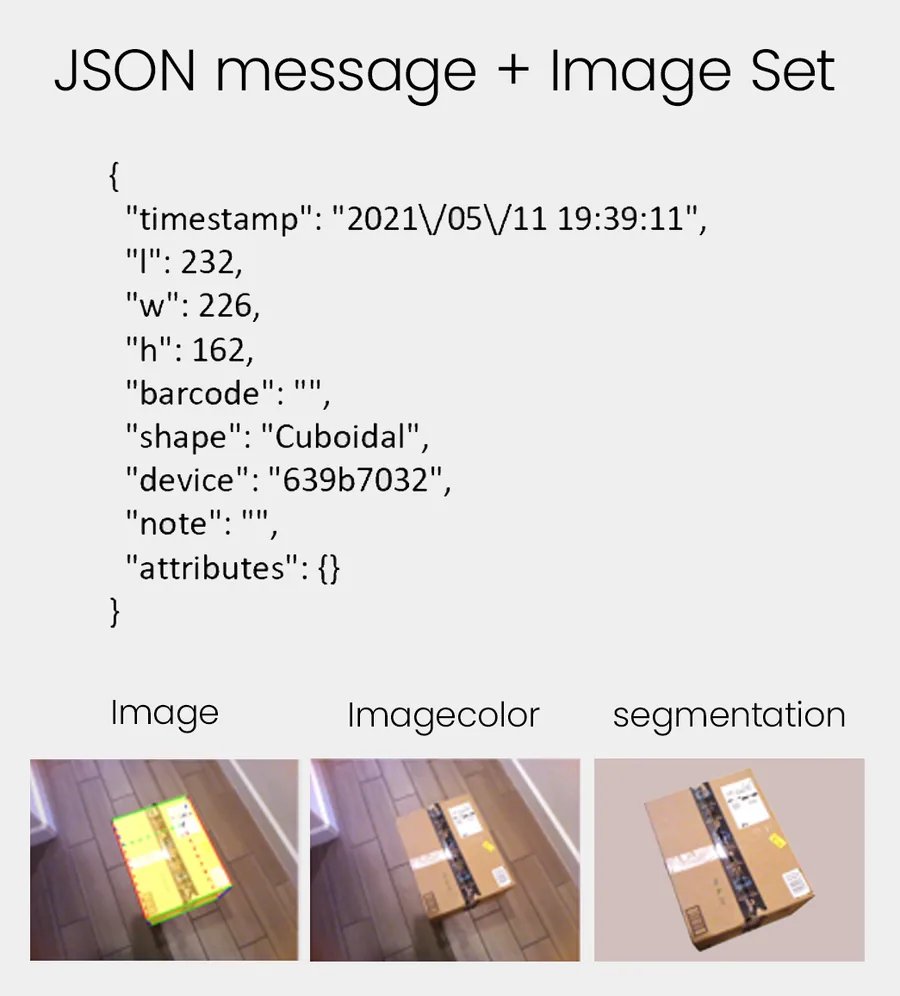
Every scan is one record. It is saved on the device and sent over HTTPS to QBOID Cloud, your WMS or ERP, or both.
| l, w, h | Length, width, height in mm (length is the longer side on the ground plane) |
|---|---|
| weight | Weight in g from a paired Bluetooth scale or the S1 scale, or typed |
| barcode | UPC, SKU label, PO or your own barcode, from the scanner or typed |
| shape | Cuboidal or Irregular |
| attributes | Your own keys and values, from the four custom keys |
| note | Free text from the operator |
| image, imagecolor, imageseg | Three photos: with the bounding box, plain, and background removed |
| timestamp, device | When, and which M2 (serial number) |
QBOID Cloud Basic is included with any app licence: review and export records before you integrate. Pro adds the API, auto refresh and data edits, as a short- or long-term bridge to your WMS.
Result · Mann Lake
10,000+ products in under two weeks.
Weights, dimensions and a photo of every item, with two M2 devices. Pending approval
Mann Lake had no weights or dimensions for its catalog, so it couldn't quote accurate shipping at checkout or plan transfer loads. Measuring by hand would have meant months of work with temporary staff. With two M2 devices, the catalog was done in under two weeks, with a photo of every item. New products are now measured on arrival.
“We couldn't optimize our shipping rates because we didn't have weights and dimensions. We were able to capture them for 10,000+ products in under two weeks.”
Also on video: Weby Corp measures tens of thousands of SKUs at receiving with the S1 · read the story Pending approval
Mann Lake: the CFO on measuring the catalog Pending approval
90% of products in the first week, with photos, into NetSuite. The M2 is still used every day at receiving to check incoming products.
FAQ
Receiving questions
Why measure items at receiving rather than later?
Receiving is the first time an item is in your hands. Dimensions and weight captured there feed every later step: putaway, slotting, packing, cartonization and shipping quotes. Fixing them later means finding the item again.
Can we check supplier dimensions instead of measuring everything?
Yes. Scan the barcode, measure, and compare with the supplier's figures in your WMS or ERP. A WorkFlows app can flag items outside your tolerance for review.
Handheld or benchtop?
Use the M2 handheld when items are on pallets, shelves or too big to lift. Dock it in the S1 benchtop station when items come to a bench at volume: a barcode scan captures dimensions, weight and photos hands-free.
How accurate is it for item master data?
Within ±0.25 in on boxes and ±0.5 in on irregular items. See the M2 spec table for size limits and materials.
What about polybags and odd shapes?
The M2 measures the bounding box of irregular items and tags the record Irregular, so downstream systems know. It can't measure transparent or shiny, mirror-like surfaces.
How does the data reach our item master?
Each scan is posted over HTTPS to your WMS or ERP, or collected in QBOID Cloud and exported. Integration partners already connect the M2 to systems such as NetSuite and SAP.
We have thousands of SKUs and no dimensions at all. Where do we start?
Start with the items that ship most or cost most to ship, measure them in a short project, then measure new items as they arrive. Mann Lake used two M2 devices for 10,000+ products in under two weeks.
How fast can we start?
Order an M2 ↗ and the Item & Parcel app ↗ from the store, or rent an evaluation unit ↗ first. QBOID Cloud Basic is included for reviewing records before you integrate.
Book a demo · Get in touch
See it measure your SKUs.
Book a 20-minute remote demo with a few of your typical items, and see the record arrive in a system like yours. Or leave your details and sales will follow up.
- Demo: about 20 minutes, remote, on items you choose
- Or leave your details: sales replies within one business day
- Ships to all US states; resellers in North and South America, EMEA and APAC
Or write to sales@qboid.ai, or call +1 (408) 419-1449.