
Solution · Shipping efficiency
Measuring irregular items
Polybags, hoses, cylinders and bundles, measured as the box they need.
The M2 records an odd-shaped item as its bounding box: the smallest box that holds it. That's the size that matters for a carton, a bin or a carrier's DIM weight. Every record is tagged Irregular and keeps three photos, so anyone can see what was measured.
- Accuracy
- ±0.5 inon irregular items, scanned top-down
- Shape
- Irregulartagged in every record
- Photos
- 3 per scanwith the box drawn on, plain, background removed
- Runs on
- M2 or S1handheld, or docked on the bench
What gets measured
The box the item needs.
An irregular item has no single length, width and height. The M2 uses one rule every time: the bounding box.
The smallest box that holds the whole item.
The box stands on the same surface as the item and encloses every part of it. Its three sides are what the record holds:
- Length: the longer side on the surface
- Width: the other side on the surface
- Height: from the surface to the highest point of the item
This is the size the next step needs. A carton or a bin has to take the whole item, and carriers bill DIM weight on the length, width and height of what they carry, not on the material inside. A coiled hose takes the space of its box, air included.
Lay the item the way it will be stored or packed. A hose lying flat and the same hose standing up have different boxes. Agree on one position per item type, and the records stay comparable.
How it's measured
Same app, same three presses.
Irregular items go through the Item & Parcel app, like boxes, and each record says which shape it was.
- 01
Scan the barcode
Of the item, its tag or the order. On the S1, the scan also starts the capture, so both hands stay free.
- 02
Measure from above
Hold the M2 more than 18 in over the item, with matte surface all around it, and press the measure key. Weight comes from the paired or built-in scale.
- 03
Check and send
The screen shows the box it measured and the shape. Save the record, or send it with its photos to QBOID Cloud or your systems.
App
Item & Parcel app
Boxes, parcels and irregular items from 0.5 in to 40 in, with weight, barcode, four custom keys and three photos per scan.
Parcel dimensioningBenchtop station
S1 Accessory
Dock the M2 over a scale for items that come to a bench at volume. S1 mode is included in the Item & Parcel app licence.
S1 AccessoryPhotos and the readout
You can see what was measured.
With an irregular item, the question later is often "which box did it measure?" The record answers it.
| On the screen and in the record | What it tells you |
|---|---|
| L, W, H | The bounding box: on screen in your units, stored in mm |
| Shape: Irregular | The dimensions are a bounding box, not a carton the item came in |
| Annotated photo | The item with the measured box drawn on it |
| Plain photo | The same view without markings, for quality checks or a product record |
| Background removed | The item on its own, for picking screens and catalogs |
| Weight, barcode, keys | From the scale and the scanner, plus your own tags such as Fragile or Oversize |
Screen capture: an irregular item on the M2
The Item & Parcel app after scanning a hose or a polybag: the item outlined with its bounding box, L, W and H, and the shape "Irregular", next to the three photos the record keeps.
Current approaches
Four ways to measure an odd shape.
Boxes are easy for most methods. Irregular items are where they differ.
| Compared on | Tape measure | Fixed dimensioning station | Phone measuring app | QBOID M2 + S1 |
|---|---|---|---|---|
| Consistency | Depends on who measures; the far points of a curved item are easy to miss | Depends on the system; some handle irregular shapes poorly | Depends on the phone and the operator | The same bounding-box rule on every scan, within ±0.5 in |
| Speed | Slow: find the extremes, read three figures, type them | Fast, once the item is on the station | Medium | One key press; on the S1, the barcode scan starts the capture |
| Shape recorded | Only if someone types it | Varies | Rarely | Tagged Irregular in the record |
| Photo | None | Some systems | A phone photo, separate from the data | Three photos, one with the measured box drawn on |
| Where it works | Anywhere | One spot; items are carried to it | Anywhere | On the bench with the S1, or where the item is with the M2 |
| Large items | Yes, slowly | Limited by the station's size | Rarely | Up to 40 in; loaded pallets and freight with the Pallets app |
| Trade-off | Errors, and no record unless typed | Floor space, installation, capital expense | Results vary by device | Not for transparent or shiny items, or in direct sunlight |
Limits, stated plainly
What it can't measure.
Better to know before a demo than after. If you're unsure about an item, send us a photo or bring it to the demo.
Transparent items
Clear glass and clear plastic can't be measured. Try clear packaging in a demo before you plan around it.
Shiny, mirror-like surfaces
Polished metal and mirror finishes can't be measured.
Direct sunlight
Measure indoors or in shade, such as inside the dock door rather than on the yard.
Size: 0.5 in to 40 in
Smaller parts: Bluetooth calipers in a WorkFlows app. Larger items, pallets and loaded freight up to 7 ft: the Pallets app.
Deformable items
Bags, cables and soft goods change shape when held. Measure them as they will be packed; on the S1 they're measured hands-free, lying on the scale.
What's around the item
A flat, matte surface all around, nothing touching the item, and the M2 held above it. Anything touching the item ends up inside the box.
Operating conditions and materials are in the M2 spec table.
Videos
The rule, and the problem it solves.
Two short videos. A full demo on irregular items is being recorded.
M2 best practices: the bounding box
The last rule of a short animation (no voice): an irregular item, a frying pan, is measured as the box around it. The earlier rules cover matte surfaces, shiny and transparent items, and holding the M2 above the item.
Irregular items: why the old ways struggle
Mostly the problem: tape measures and fixed stations on odd shapes. Little M2 scanning is shown.
Transcript. Measuring irregular items to quickly and accurately gather dimensions is plagued with inaccuracies of human error. And the problem with inflexible legacy dimensioner solutions is that it is hard to capture irregular item dimensions quickly, due to their fixed footprint. Accurately capture dimensions for all irregular items, like loaded pallets, car parts, household goods, stools, or whatever item is difficult to measure accurately. This and many other workflows are supported in a powerful, easy to use and cost-effective handheld device.
Demo video: irregular items on the M2 and S1. A polybag, a hose and a bundle scanned start to finish, showing the bounding box on screen, the Irregular tag and the record arriving in QBOID Cloud.
Where the data goes
The Irregular tag travels with it.
Each record is posted over HTTPS as it happens: dimensions in mm, weight in g, the shape and the three photos. Because the shape travels with the dimensions, your WMS, TMS or cartonization tool knows which items were measured as a bounding box.
- Straight from the device to your endpoint, or through QBOID Cloud for review and export
- From your own Android app on the M2, or with no code through WorkFlows
- Records are saved on the device and sent when Wi-Fi is available
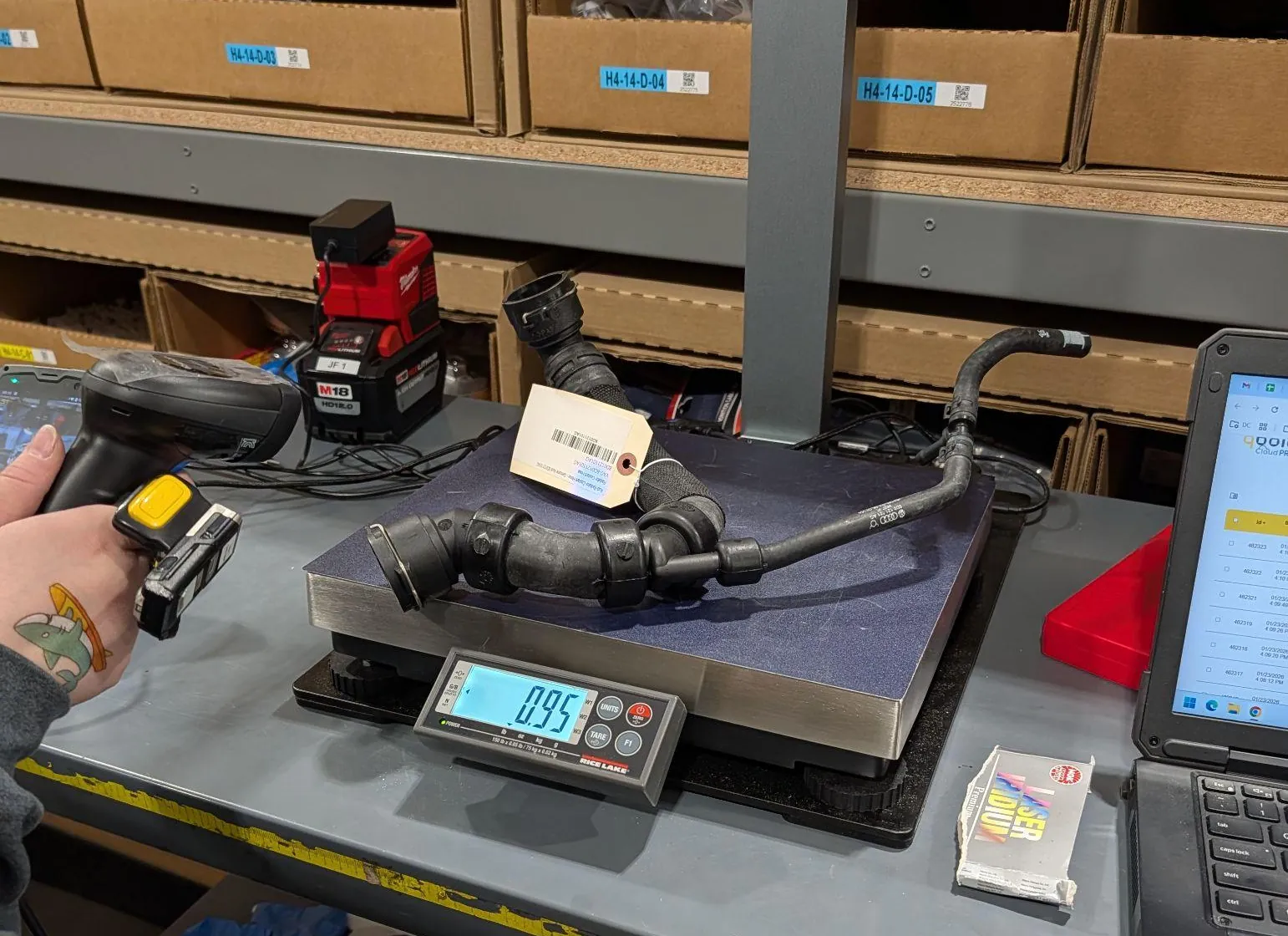
Record for the hose aboveExample values
{
  "timestamp": "2026/01/23 16:09:20",
  "l": 610,
  "w": 356,
  "h": 229,
  "weight": 431,
  "barcode": "PN-48213",
  "shape": "Irregular",
  "device": "639b7032",
  "note": "",
  "attributes": { "Oversize": "no" },
  "image": "…JPG, base64, box drawn on…",
  "imagecolor": "…JPG, base64, plain…",
  "imageseg": "…JPG, base64, background removed…"
}
l, w, h in mm (about 24 × 14 × 9 in); weight in g (0.95 lb).
FAQ
Irregular item questions
What counts as an irregular item?
Anything that isn't a box: polybags, cylinders and tubes, hoses, bundles, loose parts, tools and soft goods. Each record is tagged Cuboidal or Irregular.
How does the M2 measure an irregular item?
As its bounding box: the smallest box, standing on the same surface, that holds the whole item. Length and width are the sides on the surface, height is the highest point. The annotated photo shows the box it measured.
How accurate is it on irregular items?
Within ±0.5 in (10 mm), scanned top-down from more than 18 in. Boxes are within ±0.25 in. Conditions are in the M2 spec table.
Why the bounding box and not the item's volume?
Because that's the space the item takes in a carton, a bin or a truck, and what carriers use for DIM weight. A coiled hose needs the space of its box, air included.
Can it measure polybags and soft goods?
Yes, as they lie. Measure them in the position they'll be packed; on the S1 they're measured hands-free on the scale. The M2 can't measure transparent or shiny, mirror-like surfaces, so try clear packaging in a demo first.
What about items larger than 40 in?
Pallets, loaded freight, crates and long items up to about 7 ft go through the Pallets app on the same M2, with photos of each side.
Handheld or benchtop?
Use the M2 handheld for items on shelves, pallets or too big to lift. Dock it in the S1 when items come to a bench at volume: a barcode scan captures dimensions, weight and photos.
Book a demo · Get in touch
Bring your hardest items.
Pick the odd shapes your team dreads measuring. Book a 20-minute remote demo and watch them measured live, or leave your details and sales will follow up.
- Demo: about 20 minutes, remote, on items you choose
- Or leave your details: sales replies within one business day
- Ships to all US states; resellers in North and South America, EMEA and APAC
Or write to sales@qboid.ai, or call +1 (408) 419-1449.